ros2inspector design
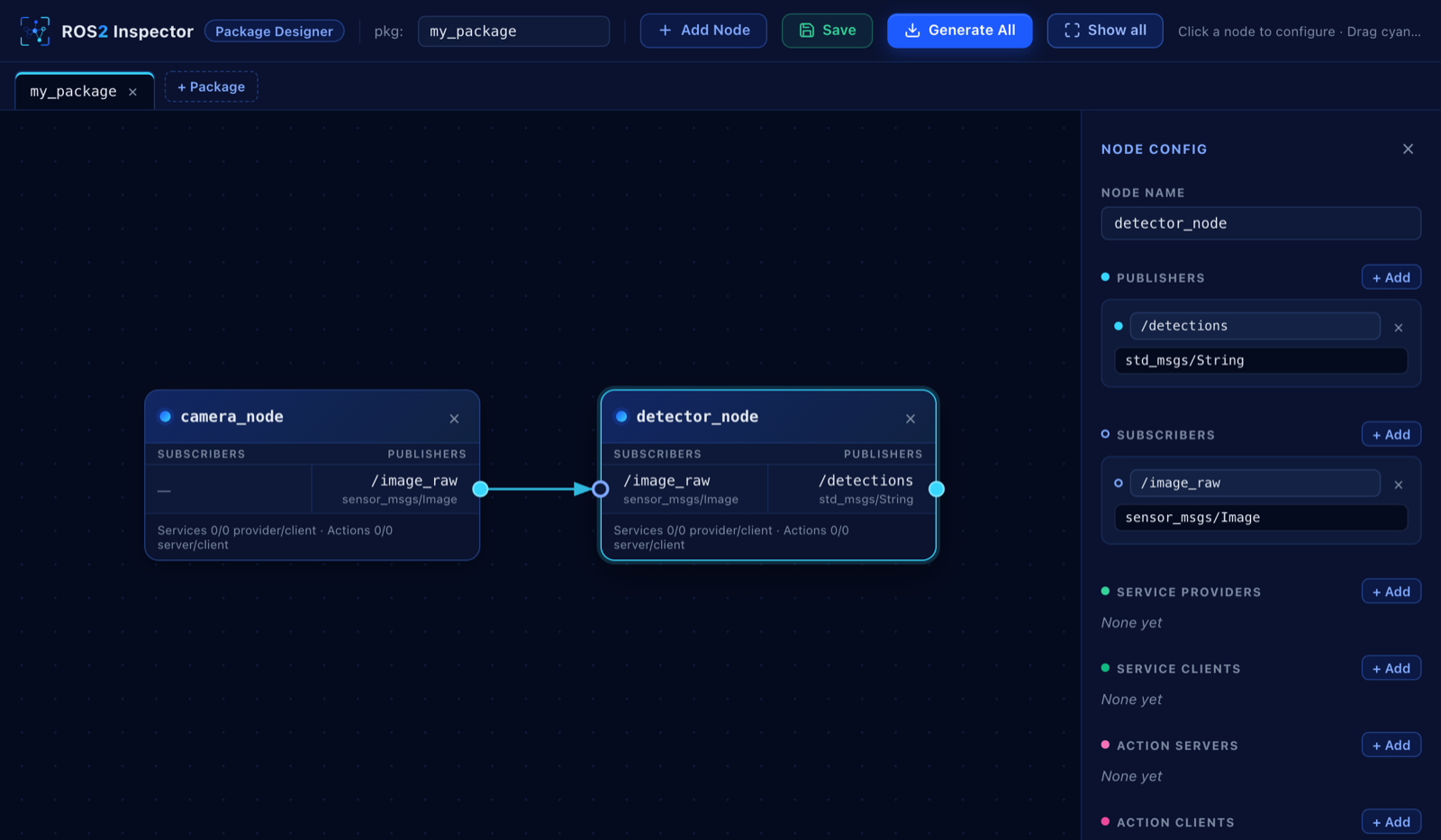
Open the Package Designer: a local, browser-based editor for ROS 2 packages. Add packages and nodes, give them publishers, subscribers, services, clients and action servers or clients, wire publishers to subscribers, then Generate ready-to-build ament_python packages.
Usage
ros2inspector design [-o DIR] [-p PORT] [--open|--no-open]
Point -o at your workspace's src/ directory so the generated packages build with colcon build straight away.
Options
| Option | Default | Description |
|---|---|---|
--output, -o | . | Directory the packages are written to |
--port, -p | 8765 | Local port for the design server; 0 picks any free port |
--open / --no-open | --open | Open the designer in the default browser |
Working in the designer
- Nodes. Click Add Node, then click a node card to edit its name and endpoints in the inspector.
- Wiring. Drag from a publisher's cyan dot to a subscriber's blue ring. Both ends need the same interface type; the subscriber takes the publisher's topic name, so the wire is a real ROS connection. If you later change one end so they no longer match, the wire turns red and dashed, and Generate asks you to fix it. Click a wire to remove it.
- Interfaces. Pick a suggested type or type any
pkg/Type;pkg/Typeandpkg/msg/Typeare treated as the same type. - Packages. Use + Package to design several packages side by side, one tab each.
- Saving. Save (or Ctrl+S) stores the design in
DIR/.ros2inspector_design.json, so it reopens where you left off. If a save fails, a banner stays on screen with an option to export the design as JSON.
What Generate writes
For each package:
| File | Contents |
|---|---|
<pkg>/<node>.py | One module per node with its publishers, subscribers, services, clients and actions |
package.xml | Package manifest with the interface dependencies the design uses |
setup.py, setup.cfg | ament_python build files with a console script per node |
launch/launch.py | A launch file that starts every node |
README.md | A short description of the package and its nodes |
test/test_copyright.py, test/test_flake8.py, test/test_pep257.py | The standard ament linter tests |
Generated code passes ament_flake8, including its 99-character line limit.
Regenerating safely
You can keep editing the generated code and regenerate after changing the design:
- A file is rewritten only if you have not edited it since the last generation. Files you added are never touched, and directories the designer did not create are never modified.
- Renaming a node moves its module and updates its constructor name,
setup.pyregistration and launch entry, even when you have edited those files. Other strings, comments and docstrings stay as you wrote them. - Renaming a package moves its directory and module folder, and is checked against imports from other generated packages first.
- When a change cannot be applied safely, Generate refuses before moving or writing anything and explains what to update by hand. For example, it refuses to delete a node that your edited
setup.pyor launch file still starts. - Warnings point out what the designer left alone, such as an edited node module that does not use a renamed topic yet.
Validation
The designer rejects names that ROS 2 refuses at startup, node names that would shadow Python modules, and reserved package names such as rclpy or ament_cmake. Errors appear next to the field that caused them.
Security
The server binds to 127.0.0.1 only and every request needs a per-session token, so other machines and other websites open in your browser cannot use it.
Examples
ros2inspector design
ros2inspector design -o ~/robot_ws/src
ros2inspector design --port 9000 --no-open
The designer currently edits one package at a time. Wiring connections between packages is planned.